What a long stay changes
A weekend hotel stay needs a router that gets past a captive portal and shares one login. A three-month apartment rental is a different job. The connection becomes your office, so you need a way to keep work running when the landlord's Wi-Fi drops. You may need your home IP address for banking or work tools that flag foreign logins. You will also notice the VPN speed ceiling every day, not once. This guide compares three GL.iNet models on those needs, using GL.iNet's datasheets and documentation as of 30 October 2026. We have not measured them ourselves.
Before you buy anything, decide how you will keep a home IP. You can run a VPN tunnel back to a router you leave at home, or use a commercial VPN server in your home country. Only the first gives you your actual home IP, and it needs a capable router at home as well as one in your bag.
The three candidates on paper
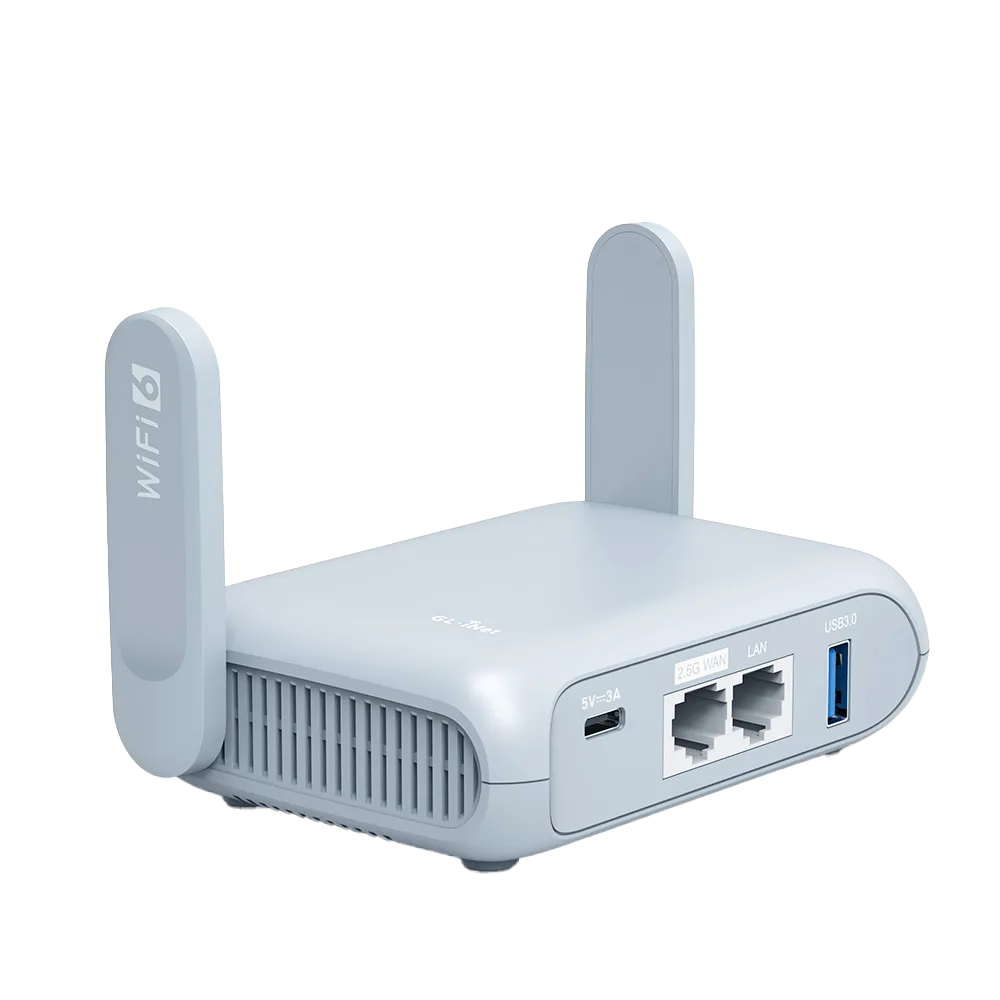
GL.iNet's Beryl AX datasheet lists a 1.3 GHz dual-core MediaTek CPU, 512 MB RAM, a 2.5G WAN and a 1G LAN port, and a USB 3.0 port. It lists WireGuard at up to 300 Mbps and OpenVPN at up to 150 Mbps. Power comes from a USB-C 5V/3A supply, with consumption under 8 W, and the unit weighs 196 g. [1] Opal's specification lists a 1 GHz dual-core CPU, 128 MB RAM, three gigabit Ethernet ports (one WAN, two LAN), USB 2.0, and USB-C 5V/3A power, at 145 g. [2] Flint 2 is a home router, not a travel one. GL.iNet lists WireGuard at up to 900 Mbps and OpenVPN at up to 880 Mbps with DCO, two 2.5G ports, four 1G LAN ports, under 20 W and 761 g. It can act as a VPN server for remote clients. [3]
| Spec | Opal (GL-SFT1200) | Beryl AX (GL-MT3000) | Flint 2 (GL-MT6000) |
|---|---|---|---|
| Role on a long stay | Light travel router | Main travel router | Stays at home as the tunnel endpoint |
| CPU / RAM | 1 GHz dual-core / 128 MB [2] | 1.3 GHz dual-core / 512 MB [1] | 2.0 GHz quad-core / 1 GB [3] |
| WireGuard maximum | Not listed in the spec page we checked | Up to 300 Mbps [1] | Up to 900 Mbps [3] |
| Ethernet | 3 x gigabit (1 WAN, 2 LAN) [2] | 1 x 2.5G WAN, 1 x 1G LAN [1] | 2 x 2.5G, 4 x 1G LAN [3] |
| USB | USB 2.0 [2] | USB 3.0 Type-A [1] | USB 3.0 [3] |
| Power | USB-C 5V/3A [2] | USB-C 5V/3A, under 8 W [1] | Mains adapter, under 20 W [3] |
| Tailscale | Listed as unsupported [5] | Not on the unsupported list [5] | Not on the unsupported list [5] |
| Weight | 145 g [2] | 196 g [1] | 761 g [3] |
Realistic VPN throughput: the worked example
GL.iNet says router VPN speeds commonly land at 30 to 50 percent of the advertised maximum. Its listed causes are encryption load on the CPU, server distance, server load, the protocol, ISP throttling, and, for a private tunnel, the upload speed at the server end. [4] Apply that rule to Beryl AX's 300 Mbps WireGuard figure and you get roughly 90 to 150 Mbps. That is plenty for video calls and most work, but below what a fast apartment line can deliver unencrypted. [1][4]
Now add a tunnel home. Suppose Flint 2 at home has a 500 Mbps download and 20 Mbps upload line, and Beryl AX abroad sends all traffic home over WireGuard. Every page you load abroad first goes out through your home connection's upload, so your browsing speed abroad is capped near 20 Mbps, whatever the apartment line or either router can do. GL.iNet names server-side upload as the bottleneck for exactly this reason. [4] If your home upload is low, send only the services that need your home IP through the tunnel and leave the rest on the local connection. GL.iNet's VPN dashboard can scope tunnels to specified devices or a domain and IP list. [6]
| Scenario | What limits speed | Planning figure |
|---|---|---|
| Beryl AX to a nearby commercial WireGuard server | Router CPU (300 Mbps max) [1] | About 90-150 Mbps using the 30-50 percent rule [4] |
| Beryl AX tunnel home to Flint 2, home upload 20 Mbps | Home upload speed [4] | About 20 Mbps or less |
| Beryl AX tunnel home, home upload 300 Mbps | Beryl AX WireGuard ceiling [1][4] | About 90-150 Mbps |
| No VPN, apartment Wi-Fi via repeater | Local line and Wi-Fi | Whatever the line delivers |
Keeping a home IP: WireGuard server or Tailscale
GL.iNet's WireGuard Server needs a public IP address from your home ISP. Without one, the router cannot act as a WireGuard server. Port forwarding is not needed if the GL.iNet router is your main home router; if it sits behind another router, you forward the port on each router in front of it. GL.iNet recommends DDNS when the public IP changes often, and points users behind CGNAT to its AstroWarp service. [7] Check for a public IP before you leave. Fixing it from abroad is hard.
Tailscale is the other route. GL.iNet's Tailscale page says the feature has been available since firmware v4.2 and is still marked beta. On a travel router you can pick a custom exit node, such as a device at home that runs as an exit node, so your traffic leaves from your home connection. GL.iNet warns against running Tailscale alongside the router's OpenVPN or WireGuard client because of routing conflicts. It also says to set a public DNS server if internet access drops while you use an exit node. Opal is on its unsupported models list. [5]
- Before departure, confirm your home ISP gives you a public IP, or set up Tailscale with an exit node at home. [5][7]
- Test the full path from a phone on mobile data while you are still at home. GL.iNet suggests checking that the public IP matches the server location. [7]
- Leave the home router on a UPS or at least auto-restart after power loss. If it stays down, your home IP is gone until someone resets it.
Fallback internet: phone tethering and Multi-WAN
GL.iNet routers can use a phone over USB as their internet source. On an iPhone you tap Trust and turn on Allow Others to Join under Personal Hotspot. On Android you choose USB tethering. You then click Connect under Internet > Tethering. GL.iNet notes that some carriers limit or charge extra for tethering. [8] Beryl AX's USB 3.0 port and Opal's USB 2.0 port both accept a phone. [1][2]
Multi-WAN turns that into automatic backup. In Failover mode, the default, the router switches to the next-priority interface when the active one fails, and switches back once the higher-priority link recovers. Low Data Mode checks the link only when a network error occurs, which suits a capped mobile plan. [9] On a long stay, set apartment Wi-Fi or Ethernet as priority one and the tethered phone as priority two, then test it by unplugging the main link.
Decision table by work pattern
Choose based on what your work needs from the connection, not on headline Wi-Fi speed. The table assumes stays of a month or more and uses the vendor figures above.
| Work pattern | Suggested setup | Why |
|---|---|---|
| Video calls all day, no home-IP need | Beryl AX with phone tethering as failover | Failover keeps calls up when local Wi-Fi drops [8][9] |
| Banking or work tools that expect a home IP | Beryl AX abroad plus Flint 2 at home (WireGuard server or Tailscale exit node) | Your traffic leaves from your home connection [3][5][7] |
| Employer VPN client on the laptop | Beryl AX with the laptop excluded from any router tunnel | Avoid running a VPN inside a VPN; per-device exclusion is in the VPN dashboard [6] |
| Streaming home-country services on a TV stick | Beryl AX with only the TV stick routed through the home tunnel | Keeps other devices off a slow home upload [4][6] |
| Light browsing and email, no VPN | Opal | Three gigabit ports and USB-C power at a lower spec [2] |
| One laptop, generous phone data, short stays | Phone hotspot only | A router adds little for one device |
Who should skip a travel router
If you travel with a single laptop, have a mobile plan with enough hotspot data, and do not need a home IP, a phone hotspot does the job with one less device to charge and carry. A router earns its place when you have several devices to keep on one private network, need wired Ethernet from a desk or TV, want automatic failover to a phone, or need a tunnel home. Opal's lower specification and lack of Tailscale support make it a poor choice for the tunnel-home case. [2][5]
Watch demos / Official walkthroughs
See the hardware in action.
Videos load from YouTube only when you press play. These are provider videos, not our own product tests.

GL.iNet / Official video
Beryl AX (GL-MT3000) - Unboxing and Setup Guide
What to look for: Identify the hardware connections and setup steps for Beryl AX; other models can differ.
Watch on YouTubeQuestions before you decide
How fast will a VPN actually run on a travel router?
Slower than the box says. GL.iNet's VPN speed FAQ says speeds commonly land at 30 to 50 percent of the advertised maximum. For Beryl AX's 300 Mbps WireGuard rating, plan on roughly 90 to 150 Mbps. Server distance, server load and your home upload speed can cut that further.
Can I keep a home IP address while working abroad?
Yes, with a tunnel back to a router at home. GL.iNet's WireGuard Server needs a public IP from your home ISP. If the home router sits behind another router, the port must be forwarded on the router in front of it. Behind CGNAT, GL.iNet points to AstroWarp, or you can use a Tailscale exit node at home on firmware that supports it.
Can a travel router fall back to my phone when the apartment Wi-Fi drops?
Yes. GL.iNet routers support USB tethering from iPhone and Android. Multi-WAN in Failover mode switches to the next-priority link when the active one fails, and switches back when the higher-priority link returns. Low Data Mode checks the link only when a network error occurs, which suits a capped mobile plan.
Is Opal enough for a digital nomad?
Only for light use. GL.iNet's Opal specification lists a 1 GHz dual-core CPU, 128 MB RAM and USB 2.0, and its Tailscale page lists Opal as unsupported. If you need a constant VPN or a Tailscale exit node home, Beryl AX is the better fit.
Sources & verification
Product details and prices can change. Check the linked provider before buying.
- GL.iNet Beryl AX (GL-MT3000) datasheet, version 20250320 Accessed 30 Oct 2026
- GL.iNet Router Docs 3: GL-SFT1200 (Opal) specification Accessed 30 Oct 2026
- GL.iNet Flint 2 (GL-MT6000) datasheet, version 20251103 Accessed 30 Oct 2026
- GL.iNet Router Docs 4: Why is my VPN speed slower than expected Accessed 30 Oct 2026
- GL.iNet Router Docs 4: Tailscale Accessed 30 Oct 2026
- GL.iNet Router Docs 4: VPN Dashboard (firmware v4.9 and later) Accessed 30 Oct 2026
- GL.iNet Router Docs 4: WireGuard Server Accessed 30 Oct 2026
- GL.iNet Router Docs 4: Tethering Accessed 30 Oct 2026
- GL.iNet Router Docs 4: Multi-WAN Accessed 30 Oct 2026
Sources link directly to providers. Product buttons may use separately labeled affiliate links. Read our disclosure.