Three home jobs, three modes
GL.iNet routers switch between modes under the network mode page. Router mode is the default and keeps every feature. Access Point mode connects to a wired network with a LAN cable and broadcasts Wi-Fi, with NAT and DHCP turned off. Extender mode connects to an existing Wi-Fi network wirelessly. [1]
The Repeater feature is a fourth option worth knowing about: it joins an upstream Wi-Fi network but keeps the router in a WISP-style setup with its own subnet and firewall. That is the travel setting, and at home it creates a second network layer behind your main router. [2]
| Job at home | Mode | Connection | What you give up |
|---|---|---|---|
| Wi-Fi in a room with an Ethernet jack | Access Point [1] | LAN cable from the main network | NAT, DHCP, VPN, port forwarding, guest network; admin address changes [1] |
| Fill a dead zone with no cable | Extender [1] | Wireless to the main Wi-Fi | Throughput, when one radio and channel carry both links [1] |
| Separate network for a guest or a test lab | Router with Repeater [2] | Wireless to the main Wi-Fi | Devices on it cannot easily reach devices on the main network (double NAT) |
| Spare router when the ISP router fails | Router [1] | WAN port to a working modem or fiber box | Coverage and port count compared with a home router [3][4] |
Access point off a wired port: the cleanest setup
If a room has a live Ethernet jack, or you can run a cable from the main router, Access Point mode gives that room fresh Wi-Fi without a second network. GL.iNet says the router stops doing NAT and DHCP and acts as a wireless transmitter and switch, so devices get addresses from your main router and can see each other normally. [1]
Three things change. The admin panel is no longer at the original LAN address; you find the router's new address in the main router's client list. [1] Features that depend on routing are off, including VPN, port forwarding, DHCP server and guest network. [1] And client devices may need to reconnect after the switch. [1] If you lose access entirely, holding reset for 4 seconds returns it to Router mode. [1]
Name the access point's Wi-Fi the same as the main network only if you are comfortable with how your devices roam; GL.iNet notes that placement, channel choice and coverage overlap affect roaming between access points. [1]
Extender: when there is no cable
Extender mode joins your existing Wi-Fi and re-broadcasts it. GL.iNet warns that when the upstream link and clients share the same radio and channel, this consumes additional airtime and can reduce throughput. [1] Unlike Access Point mode, the admin panel stays at the router's original LAN address. [1]
Placement decides most of the result: put the travel router where it still gets a solid signal from the main router, not in the dead zone itself. A good test is to stand at the planned spot with a phone, run a speed test on the main Wi-Fi, and only use that spot if the number is acceptable, because the extended network cannot be faster than its link back.
Spare router during an ISP-router failure
If the ISP router fails but the modem, ONT or fiber box in front of it still works, a travel router in Router mode can take over. Connect the modem to the travel router's WAN port, then set the connection type under INTERNET, then Ethernet. DHCP is the default; Static and PPPoE are available if your ISP uses them, and GL.iNet notes PPPoE setup needs the username and password your ISP provides. [5]
Write the PPPoE username and password, and any VLAN ID your provider requires, on paper before you need them. GL.iNet says a VLAN tag is only needed if the provider requires one. [5] Without those details, a working modem and a working router still will not connect.
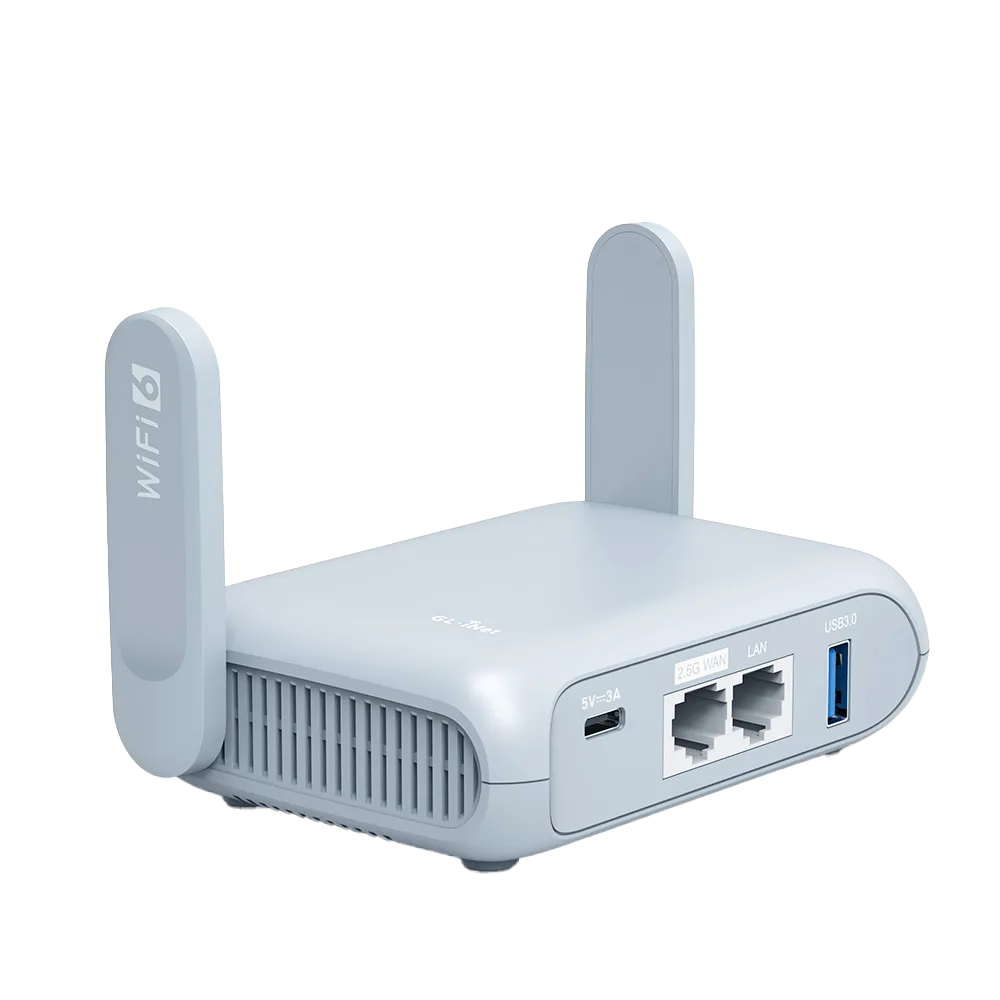
Expect a smaller network. Beryl AX has one 2.5G WAN port and one 1G LAN port; Opal has two gigabit LAN ports. [3][6] Plug a small switch into the LAN port if a desktop, a printer and a TV all need cables.
Spec limits that matter at home
Wi-Fi ratings in datasheets are maximum link rates, not what a device will see across a house. They are still useful for comparing classes of hardware.
| Opal | Beryl AX | Flint 2 | |
|---|---|---|---|
| Wi-Fi | Wi-Fi 5: 300 Mbps (2.4 GHz), 867 Mbps (5 GHz) [6] | Wi-Fi 6: 574 Mbps (2.4 GHz), 2402 Mbps (5 GHz) [3] | Wi-Fi 6 4x4: 1148 Mbps (2.4 GHz), 4804 Mbps (5 GHz) [4] |
| Ethernet | 1 WAN + 2 LAN, gigabit [6] | 1 x 2.5G WAN, 1 x 1G LAN [3] | 6 ports including two 2.5G; 4 x 1G LAN [4] |
| Power | USB-C 5V/3A [6] | USB-C 5V/3A, under 8 W [3] | 12V/4A barrel, under 20 W [4] |
| Network modes listed | See GL.iNet mode page [1] | Routing, AP, wireless bridge, wired bridge [3] | See GL.iNet mode page [1] |
When a real home router is better
A practical split: keep the travel router as the outage spare and the room fix, and buy a home router when you find yourself using it as the main router for more than a few weeks.
| Situation | Travel router at home | Home router such as Flint 2 |
|---|---|---|
| One room with a dead zone | Fine as an access point or extender | Overkill for one room |
| Whole-home coverage | One compact unit; 2402 Mbps 5 GHz rating on Beryl AX [3] | 4x4 Wi-Fi 6 radios [4] |
| Several wired devices | One LAN port on Beryl AX [3] | Five LAN ports [4] |
| Fast fiber plan above 1 Gbps | LAN port is 1G on Beryl AX [3] | Two 2.5G ports [4] |
| VPN for the whole house | Only in Router mode [1] | Router mode is the normal mode |
| A spare for outages and trips | Good fit: one device does both | Not portable |
Watch demos / Official walkthroughs
See the hardware in action.
Videos load from YouTube only when you press play. These are provider videos, not our own product tests.
GL.iNet / Official video
Beryl AX (GL-MT3000) - Unboxing and Setup Guide
What to look for: Identify the hardware connections and setup steps for Beryl AX; other models can differ.
Watch on YouTubeQuestions before you decide
Is a travel router a good Wi-Fi extender?
It can fill one dead zone, but GL.iNet notes that when the upstream link and your devices share the same radio and channel, extender mode consumes extra airtime and can reduce throughput. If you can run a cable, Access Point mode avoids that.
How do I get back into the router after switching to Access Point mode?
GL.iNet says the original LAN address no longer works in Access Point mode. Find the router's new address in your main router's client list, or hold the reset button for 4 seconds to return it to Router mode.
Can a travel router replace my ISP router if it dies?
Only the routing and Wi-Fi part. Beryl AX supports DHCP, Static and PPPoE on its WAN port, so it can connect to a working modem or fiber box. It has no built-in cable, DSL or fiber modem, so if the failed device was a combined modem-router you still need a replacement from the ISP.
Will I keep my VPN on the travel router in Access Point mode?
No. GL.iNet lists VPN, port forwarding, DHCP server and guest network among the features unavailable in non-Router modes. Use Router mode, or run the VPN on the main router or on each device.
Sources & verification
Product details and prices can change. Check the linked provider before buying.
- GL.iNet Router Docs 4: Network Mode Accessed 30 Oct 2026
- GL.iNet Router Docs 4: Repeater Accessed 30 Oct 2026
- GL.iNet Beryl AX (GL-MT3000) datasheet Accessed 30 Oct 2026
- GL.iNet Flint 2 (GL-MT6000) datasheet Accessed 30 Oct 2026
- GL.iNet Router Docs 4: Ethernet (WAN) Accessed 30 Oct 2026
- GL.iNet: Opal (GL-SFT1200) product page Accessed 30 Oct 2026
Sources link directly to providers. Product buttons may use separately labeled affiliate links. Read our disclosure.